Juice Blast Puzzle
Reviews
Juice Blast Puzzle stands out in the crowded match-3 genre by prioritizing relaxation over urgency. The core loop of aiming and matching is immediately satisfying, and the lack of a timer allows for thoughtful, strategic play. The visual design is clean and inviting, making long sessions easy on the eyes. While it may not offer the complexity of some puzzle games, its accessible nature and family-friendly presentation make it an excellent choice for casual players seeking a low-stress mental workout. The web-based platform ensures you can start a game in seconds, anywhere.
Description
Core Matching Logic
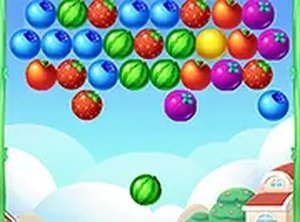
At its heart, Juice Blast Puzzle is a thoughtful matching game. Players control a launcher at the bottom of the screen, sending colorful fruit pieces upward toward a suspended cluster. The primary objective is to group three or more identical fruits together. When a successful match is made, those fruits pop and vanish, earning points and gradually reducing the cluster. The game ends when the entire cluster is cleared or a predetermined point threshold is reached. This straightforward rule set makes it easy to pick up, but the need to plan each shot adds a layer of satisfying strategy.
Strategic Shot Planning
Success in Juice Blast Puzzle hinges on careful aim and foresight. Each launch sends a fruit on a straight path, so players must adjust their angle to hit specific spots. A well-placed shot can trigger a chain reaction, where one match causes neighboring fruits to fall into new groups, creating additional matches automatically. These cascades are key to clearing the board efficiently and achieving high scores. Since there is no clock counting down, players can take as long as they need to study the layout and decide on the most effective move, making the experience more about mental planning than speed.
Visual Design and Atmosphere
The game presents a bright and cheerful aesthetic, with each fruit rendered in vivid, easy-to-distinguish colors. The background is clean and uncluttered, keeping the focus on the puzzle itself. Subtle animations accompany each match, providing satisfying visual feedback without being distracting. The sound effects are light and pleasant, reinforcing successful moves with a gentle pop. This combination of visuals and audio creates a relaxed atmosphere that encourages extended play without causing fatigue, making it suitable for players of all ages, including younger children.
Accessibility and Platform Support
Juice Blast Puzzle is designed for broad accessibility. It runs directly in a web browser, requiring no software installation or account creation. The controls are simple: on a desktop computer, players use the mouse to aim and click to launch; on a tablet or phone, a tap on the screen performs the same action. The interface adapts to different screen sizes, ensuring a consistent experience whether playing on a large monitor or a small mobile display. A full-screen mode is available for those who want an immersive view, further enhancing the casual, pick-up-and-play nature of the game.







Comments
0 comments