Retail Operations: Shop Management Game
Reviews
Retail Operations offers a calm, methodical approach to business simulation. The game excels in teaching fundamental retail concepts through practical scenarios. Its strength lies in the clear connection between player decisions and measurable outcomes. The gradual expansion system prevents overwhelm, while the financial dashboard keeps you informed without being tedious. For players who enjoy strategic thinking and want to understand how a grocery store operates, this title provides a satisfying and educational experience. The simple controls and helpful tutorial make it accessible to newcomers.
Description
Core Business Decisions
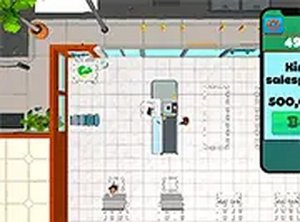
Retail Operations puts you at the helm of a neighborhood grocery store. Your daily tasks involve choosing which products to stock, setting prices that attract customers while maintaining healthy margins, and organizing the sales floor for smooth traffic flow. Each choice directly affects shopper satisfaction and your store's financial health. The simulation presents realistic scenarios drawn from actual retail management, requiring careful thought rather than quick reactions.
Customer Satisfaction Metrics
Shoppers in this game provide clear feedback through on-screen indicators. You can see which products are popular, which prices seem fair, and how long customers wait at checkout. Responding to this feedback is essential for building a loyal customer base. The game tracks satisfaction levels over time, allowing you to see the results of your adjustments. A balanced approach that considers both customer needs and operational costs tends to produce the best outcomes.
Store Expansion Options
As your business generates profits, you can reinvest in improvements. Additional shelving units let you offer a wider product range. Better signage helps customers find items quickly. Expanding the floor space accommodates more shoppers and reduces crowding. These upgrades are gradual, so you must prioritize based on your current budget and store performance. The game encourages thoughtful planning rather than hasty spending.
Financial Tracking Tools
Retail Operations includes a detailed financial dashboard. You can review daily sales figures, expense reports, and profit margins. This information helps you identify which product categories perform best and where costs might be trimmed. The game does not require advanced accounting knowledge; the numbers are presented clearly, with trends visible over time. Regular review of these reports is a key habit for successful players.
Accessible Controls and Tutorial
The game uses simple mouse-based controls. Clicking on shelves restocks items, and the checkout area processes transactions. A comprehensive tutorial walks new players through the initial steps, explaining each interface element. A full screen option improves visibility on larger monitors. The design ensures that players of all experience levels can jump in without frustration.








Comments
0 comments